Front desk chat
Look up patients, move the schedule, and run confirmations in plain language. Staff click to send.

NORA runs the calls, texts, and lookups your staff authorizes. They decide what happens. NORA does it. Patients who call your office still reach a person.
Nothing goes to a patient until someone on your team clicks.
Look up a patient, draft a text, or place a call. The click is the approval. No click, no send.
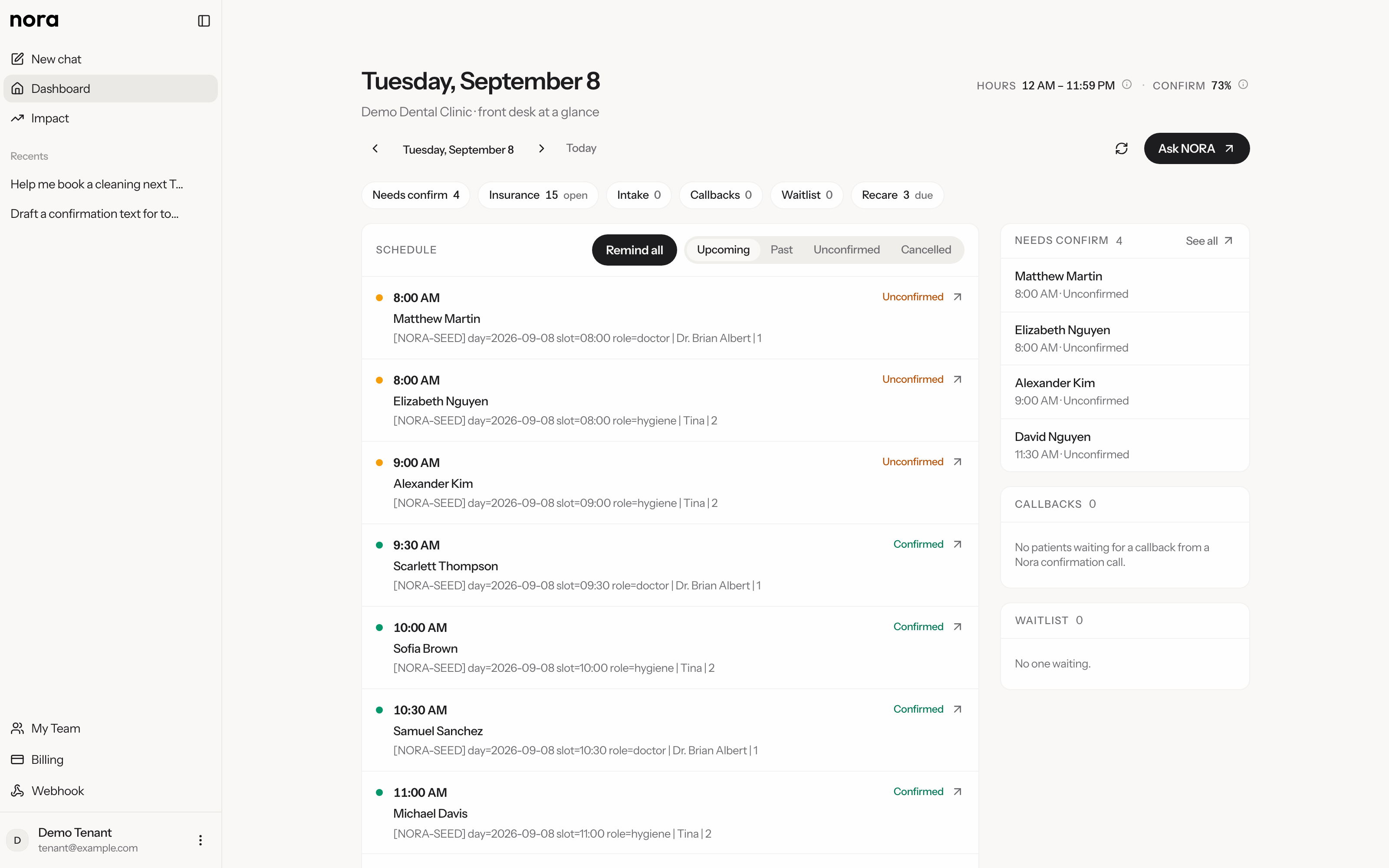
Unconfirmed, Insurance, Intake, Gaps, Waitlist, Recare, and Callbacks. The same schedule as your practice software.
Reminders go through Spruce. Call patient is outbound only. The number is classified as medical at the carrier so it is not screened as spam.
Clear for staff, tied to the practice software, and never a second schedule.
Look up patients, move the schedule, and run confirmations in plain language. Staff click to send.
Owner sets the rates
The numbers move with the work.
Outbound confirmation calls your staff authorize. Patients who call the office still reach a person.
Texts through Spruce, and calls when you click Call patient. Confirm visits and cut no-shows.
If it is not on this list of noes, do not assume it. The product is the staff workspace, not the office line.
Patients who call your office still reach a person. NORA does not sit on the main line, after hours or during the day.
Booking, texting, and calling wait on a staff click. There is no unattended receptionist running the practice.
Practice software stays the system of record. NORA reads it and writes back when you approve. It is not a parallel database.
There is no public chat widget on the practice website. Intake on the board is paperwork the front desk still has to finish.
Impact counts calls NORA placed, texts NORA sent, and slots NORA booked after a click. It applies the rates you set. Change a rate and every period recalculates.
A call is a call NORA placed. A text is a reminder or confirmation NORA sent. A book is an appointment written after you clicked Book. Confirmations are time saved, not a new slot.
Practice owners set receptionist salary, minutes saved per call and text, and typical filled-slot value under Settings. Assistants can see Impact. They cannot change rates.
Hours saved times hourly rate, plus booked slots times typical value. If salary is empty, time in dollars stays blank. Counts still show.
Tenant isolation. Encrypted end to end (TLS 1.3, AES-256). BAAs all the way down. PMS stays system of record. We handle deployment and support.
Practices are isolated by practice configuration. Patient data is not marketed as a private, dedicated cloud per office. We run the service and keep tenants apart.
NORA sits on a unified layer built to speak to most major dental systems, not one. Dentrix is what we have proven in production, and that is the honest answer today. Another system is a conversation, not a rebuild.
TLS 1.3 in transit, AES-256 at rest, and BAAs with every applicable service provider. Compliance is part of the product, not a checkbox at the end.
We handle deployment, configuration, and ongoing support. The practice does not touch a server or a config file.
NORA is the staff workspace: chat with click-to-send, a front desk board, Spruce reminders, outbound Call patient, Impact, and connectors. Staff decide. NORA does it. Patients who call the office still reach a person.
NORA sits on a unified layer built to speak to most major dental systems, not one. Dentrix is what we have proven in production, and that is the honest answer today. Another system is a conversation, not a rebuild.
On infrastructure we operate, with tenant isolation. Data is encrypted in transit (TLS 1.3) and at rest (AES-256), with BAAs all the way down. The PMS stays the system of record.
No. NORA places outbound calls your staff authorize. Patients who call your office still reach a person. There is no after-hours inbound receptionist, and there cannot be one on the practice main line.
They can reply STOP, CANCEL, UNSUBSCRIBE, QUIT, or END. Full SMS consent details are in our privacy policy.
Sales go through a conversation, a connector, and a BAA. Email tyler@tjo-innovations.com or use the contact page.